Your screens, in perfect harmony.
FloSync is free software for digital signage and video walls. Run videos, images, and web content across one computer or many.
macOS and Windows • No monthly fees
Everything you need to run
multi-screen playback
One workflow for digital signage and professional video walls.
Tight Sync
Tight synchronization keeps your screens aligned automatically, even during long-running playback.
Three Screen Modes
Independent, Mirrored, or Spanned. Show different content on each screen, mirror the same content, or span across screens.
Time-Based Scheduling
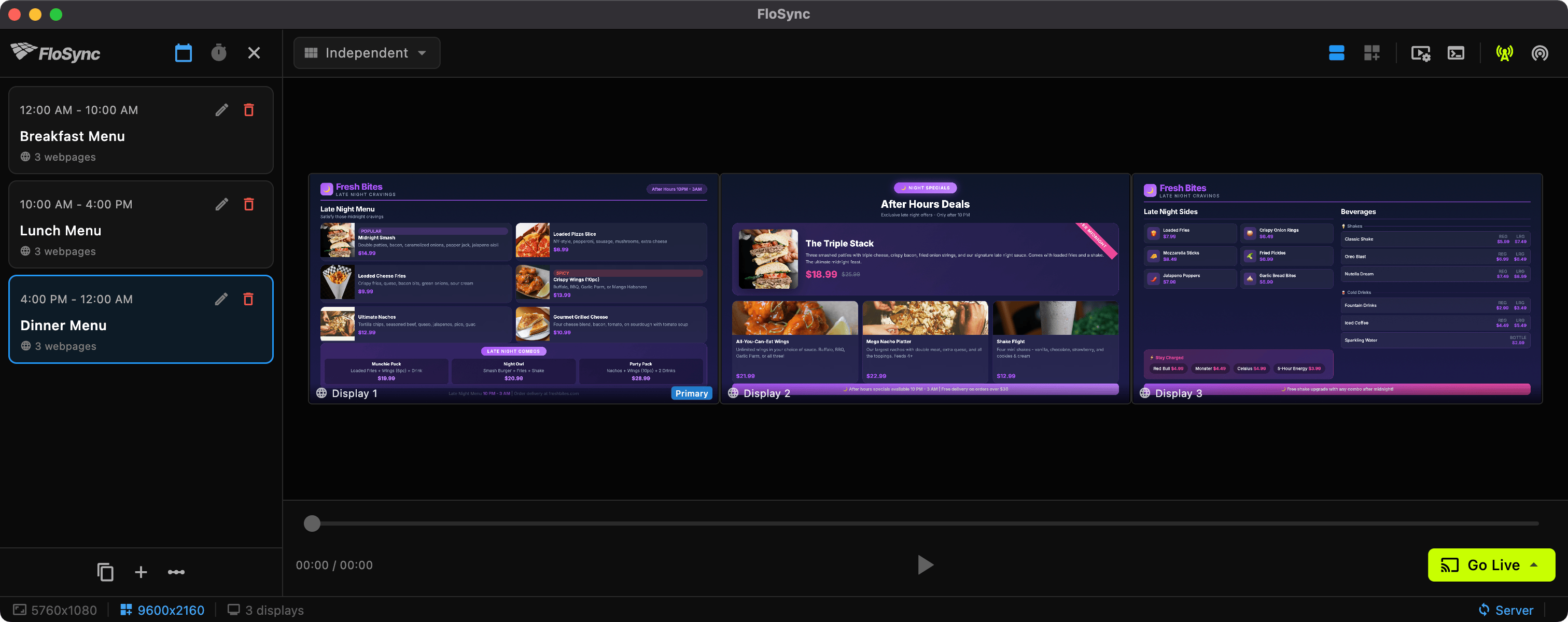
Schedule different content for different times of day. Set unique schedules for each day of the week with automatic transitions.
Network Sync
Synchronize across multiple computers. Build large video walls with automatic discovery and dependable playback alignment.
Videos, Images & Web
Support for professional video formats (ProRes, HEVC, H.264), images (including animated GIFs), and live web pages.
One-Click Go Live
Preview your setup, then go fullscreen on all screens with a single click. Easy setup, professional results.
From setup to live playback.
In minutes.
Load Your Content
Drag and drop videos, images, or web URLs onto any screen. FloSync handles the rest.
Configure Your Layout
Choose your screen mode, set up scheduling, and preview everything in the composer view.
Go Live
Hit Go Live to launch fullscreen playback across all assigned screens.
Two workflows.
One app.
Digital Signage Operations
Menus, promos, and in-store screens that run all day with straightforward setup and dependable playback.
- One-computer multi-screen control
- Scheduling for dayparts and weekly routines
- Fast setup without IT overhead
Pro AV and Video Walls
Multi-computer playback for larger walls with tight visual alignment and dependable show control.
- Server/client network sync
- Spanned layouts and global canvas workflows
- Controller-mode operation for live environments
Ready to run your screens with FloSync?
Start free, launch quickly, and scale when your setup grows.
Version 0.1.0 · Free to use